40 Minutes. 6 Agents. 3 Competing Homepages.
Updated
New: see what an AI assistant sees when it looks at your site. Run the check
ResourcesGuide
Neural Bot is our Reachy Mini robot powered by Claude, ElevenLabs, and local speech-to-text. Here’s what connecting an agent to a camera and motors taught us about AI in the physical world.
Neural Bot sits on a desk in our lab. It’s a Reachy Mini, the open-source desktop robot from Pollen Robotics, now part of Hugging Face. It has a head that moves on six axes, a body that rotates, two antennas, a wide-angle camera, a microphone array, and a speaker. It has no arms and no legs. It can’t pick anything up.
That’s the point. We didn’t buy a robot to get into robotics. We bought one to answer a question that matters to everything else we build: what happens when an agent stops living in a browser tab and starts living in a room?
Most of our work is agentic systems that read, decide, and act through software. Neural Bot is the same loop with a physical surface bolted on. The lessons carry straight back to the screen.
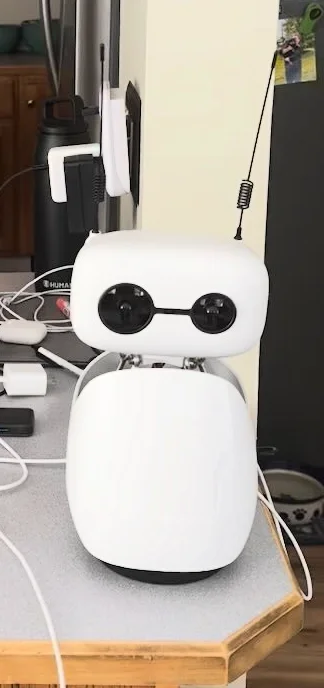
It’s cheap enough to experiment with (the Lite version starts around $299, wireless around $449), open enough to take apart, and small enough to live on a desk. The SDK is Python, there’s a simulator for development without the hardware, and it ships with libraries of recorded dances and emotional gestures. We forked the SDK and built our own layer on top.
Open hardware mattered more than we expected. When something broke, we could read the daemon, the kinematics, and the media pipeline instead of filing a support ticket.
Every interaction runs the same cycle:
Nothing about that loop is robot-specific. It’s perceive, reason, act, remember. The body just makes every weakness in it impossible to ignore.
The model never touches a motor. It writes plain text with small tags at the end, like [EMOTION:curious] or [DANCE:side_to_side_sway]. Our code strips the tags out, speaks the rest, and hands the tag to the motion system.
Two design choices made this safe and fast.
Allowlists, not freedom. The model can only pick from named moves we loaded. If it invents one, nothing happens. For physical actions, that’s the right default: the agent chooses from a menu, it doesn’t write the recipe.
Tags over full tool calls. One pass, no round trip. The model decides what to say and how to move in the same breath, which keeps speech and gesture in sync.
The same pattern works for any agent that touches the real world, physical or not. Charging a card, sending an email, and nodding a robot head all benefit from a short, validated list of allowed actions.
In a chat window, three seconds feels fine. Standing in front of a robot, three seconds of silence feels broken.
So we budgeted every step. A small local speech-to-text model. Responses capped at one or two sentences because they’re spoken aloud. Raw audio from ElevenLabs text-to-speech to skip decoding. Camera frames sent for the current turn only, never stored in history, so context stays lean.
The best trick wasn’t technical. While the model thinks, Neural Bot tilts its head up and to the side with a bouncy, cartoonish motion. People read it as “it’s thinking” and wait patiently. A physical cue buys time that a spinner never could.
Next on the list: streaming the response sentence by sentence into speech so it starts talking before it’s finished thinking.
Conversation is turn-based. The world isn’t.
A lot of the engineering is deciding what not to react to. When music is playing, the bar for “that was speech” goes up. If a recording runs 15 seconds without a pause, it’s a song, not a person, so we drop it. Music pauses only after we’ve confirmed real speech, and resumes afterward.
When known-face photos are configured, presence detection runs on its own thread, checking a couple of times per second for a face. If it recognizes someone walking up, Neural Bot greets them, then waits a full minute before it’ll greet again. Without that cooldown, it’d say hi every time you leaned out of frame.
Software agents face the same problem with inboxes, webhooks, and event streams. Filtering is the job.
After each exchange, a background pass extracts concrete facts: names, preferences, running jokes. Neural Bot keeps a small, capped list and skips duplicates. Those facts quietly shape how it talks next time.
The difference is immediate. A robot that remembers your name and what you asked for yesterday feels like a presence. One that doesn’t feels like a demo.
It also raises the stakes, which brings us to the next one.
A camera and memory in a shared space are not just product features. They are privacy decisions.
The current setup recognizes faces only when photos have been configured for known people; it has no enrollment or consent flow of its own. Camera frames go to Claude for the current turn but aren’t kept in conversation history. Speech is transcribed locally, while the transcript goes to Claude and response text goes to ElevenLabs. Remembered facts live in a small local file that the operator can inspect or delete. Those boundaries matter, but they don’t make this an offline or private-by-default robot.
Any agent that watches and remembers, in a store, an office, or a home, needs the same thinking before launch, not after.
Neural Bot uses a local speech-to-text model to turn microphone audio into words. Claude handles the reasoning and the current camera image; ElevenLabs turns its reply into speech. That split let us build the interaction loop without running the reasoning model on the robot.
It also sets real limits. Each turn needs network calls, so latency matters. The current camera frame and the transcript leave the machine for Claude, and the reply text goes to ElevenLabs. Local transcription does not mean the whole conversation stays in the room. We design around those boundaries rather than claiming an on-device brain we do not run.
The part we find most interesting isn’t the code. It’s how people change around it.
Do people talk to Neural Bot differently than they talk to a chat box? Do they forgive mistakes more when there’s a face attached? Does the room itself change when something in it is paying attention? We don’t have clean answers yet. We have a robot on a desk and a growing list of observations.
For the businesses we work with, especially experience-driven retail, that question isn’t abstract. Agents are about to show up in showrooms, kiosks, and counters, not just websites. How people respond to an AI with presence is worth understanding before it’s standard.
If you want to run the same experiment:
Neural Bot says hi.